Leads, contacts and companies with context, a drag-and-drop deals board with a forecast, quotes and billing models, and tasks that stop follow-ups slipping.
Leads page, fit scores and a contact log.
Import from CSV, HubSpot, Apollo or LinkedIn.
Deals with quotes, deal people, and hourly, flat fee or retainer billing.
Every person has a pay rate and a bill rate, and CloudTeams works out the margin. See who is free, find the best fit, and check paperwork before the placement.
Skills, pay rate, bill rate and automatic margin.
Bench view, staffing, open roles and the talent matrix.
Plan the project, track approved hours and prepare invoices and contractor payouts from the same records. Stripe payments are in test mode; real money is sent outside CloudTeams.
Gantt and kanban, with a margin forecast against target.
Timesheets with a weekly hours cap, approvals and expenses.
Invoices from approved hours, billed once, as a PDF you can email.
Separate tools each see only their own slice. Because CloudTeams keeps sales, staffing, delivery and money on one record, its AI can connect the dots between them. That is the difference.
New
AI Task: the task you would not think of
One click and CloudTeams looks across deals, talent, projects and money, then suggests one specific task worth doing today. Nothing is saved until you add it.
Tasks4 open
Intelligence
You have nothing overdue. 3 tasks are due today.
Generate another AI task
Today
AI task Suggested for today
Introduce the free designer to the open design seat
Product Designer · Helios Energy
A designer is available from Monday, and one client still has an unfilled design role.
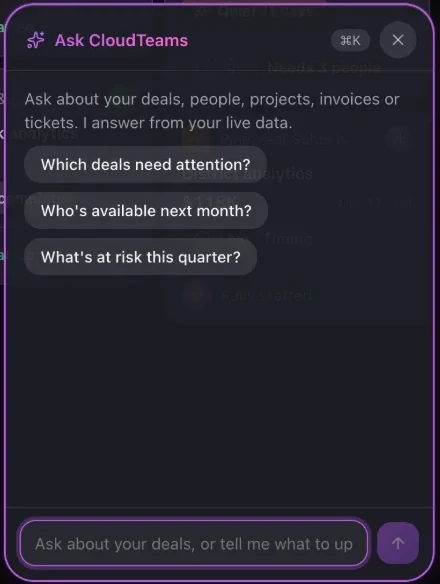
Press ⌘K on any page and ask about deals, people, projects, invoices or tickets. It answers from your live data, links to the records, and drafts the follow-up for your review.
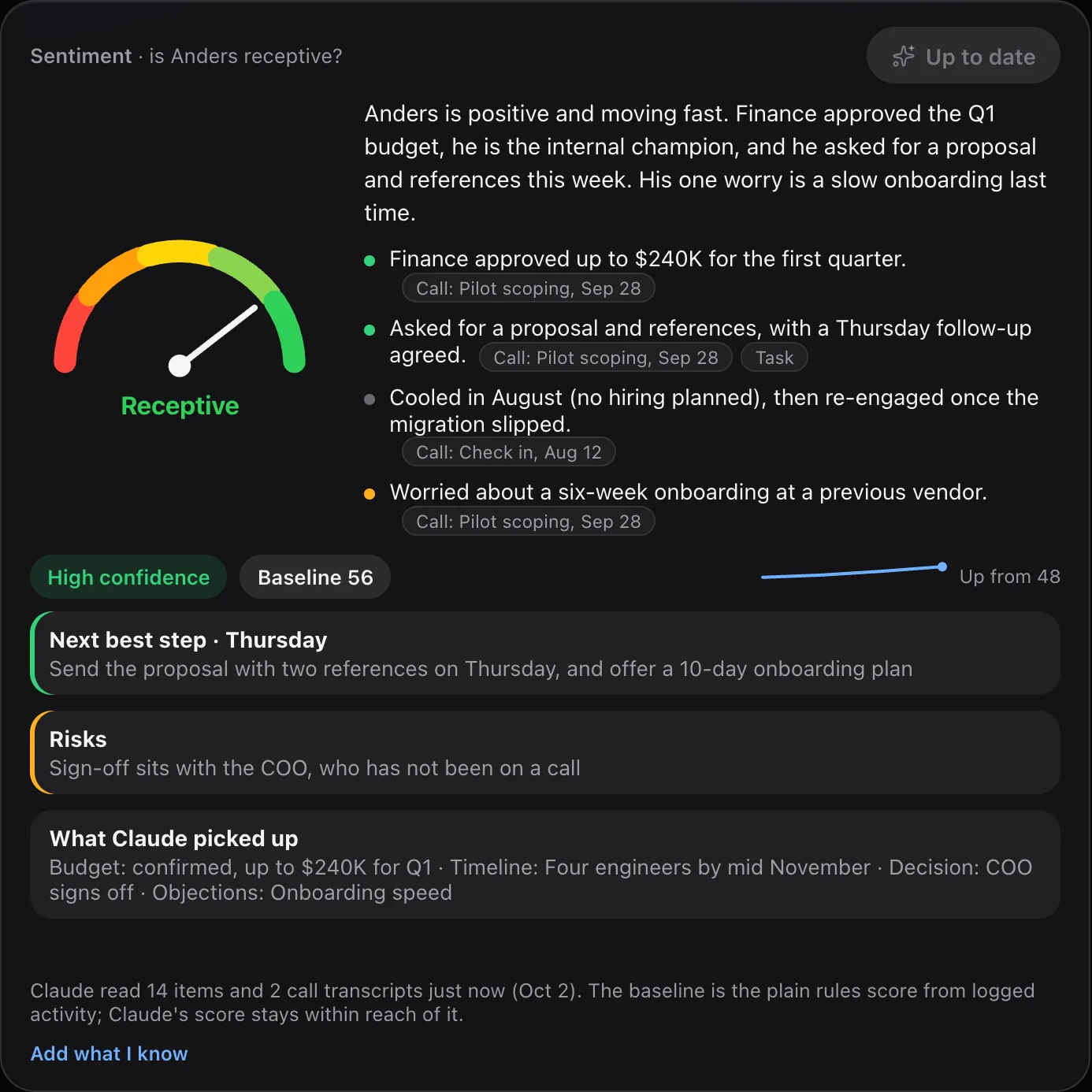
Built-in intelligence on every page.Rule-based insights with a next step, fit scores, and a baseline sentiment score. Free, instant, and no key needed.
You hold the controls.Your own key for Anthropic Claude or OpenAI, a model for each feature, a monthly spend cap that can pause AI, and usage tracking.
Use the mic or hands-free Talk mode in Ask CloudTeams. A spoken “add a to-do” needs a spoken yes.
Max Intelligence
A report on revenue and AI spend, with a PDF you can save.
AI Shortlist
The top 5 people to contact, each with why now and a draft message.
Leads Health
A health card for your leads, and one-tap Log outreach so follow-ups do not slip.
Privacy. AI features send the relevant records, and any call transcripts you added, to Anthropic or OpenAI, using your own API key. An admin connects the key. Agents and the Telegram bot draft, and a person approves before anything is sent or written. CloudTeams’ built-in intelligence is rule-based and runs inside CloudTeams.
Contractor portal
Give contractors their own login.
Contractor portal
They see their hours, pay and paperwork. Only their own.
Each contractor signs in separately. You stop answering “where is my money?” by email.
Timesheets, expenses, invoices and payouts in one place.
A paperwork checklist, and only their own data.
Messages with desktop and phone push notifications.
Contractors sign in with the Google, Microsoft or GitHub account they already have.
Sign in with Google, Microsoft or GitHubGoogle Gmail and CalendarAnthropic Claude and OpenAI, with your own keyResend, for invoices, invites and booking emailsTelegram, through CumuloBot
Also
Stripe payouts and invoice checkout are built and run in test mode. Real-money payments are not live.
Zoom: paste a Zoom link into a meeting type.
Import from CSV, HubSpot, Apollo or LinkedIn exports, PDF profiles and call transcripts as text files.
CloudTeams is in early access. Book a demo to discuss your firm, see the product and get pricing. Our team sets up access; there is no self-serve signup.
No per-seat enterprise pricing. Optional AI uses your own provider key, with usage charged to that provider account.
Use CloudTeams in your browser, or install the web app. Native apps are coming soon.
FAQ
Questions, answered.
Who is CloudTeams for?
Founders and operators of small consulting, engineering and go-to-market shops that sell projects and staff them with contractors.
Can I import my data?
Yes. Import contacts from a CSV, a HubSpot or Apollo export, or LinkedIn’s own export, and talent from CSV or LinkedIn. You can also add LinkedIn or Upwork PDF profiles and call transcripts as text files. A dry run shows what will happen before anything is saved. You can also export your data as CSV and take a one-click backup.
How are contractors paid?
Contractors log hours and expenses in their own portal. You approve them, invoice the client from the approved hours, and create payouts. Stripe payouts and invoice checkout are built and run in test mode only, and real-money payments are not live. For now you send the money yourself and mark the payout paid.
Which AI does CloudTeams use?
Core AI features use your own Anthropic or OpenAI key, connected by an admin. Strategic AI Cloud Teammates have their own model choices. Admins choose the model for each feature and set a monthly cap that can pause AI, and usage is tracked. AI features send the relevant records to your provider. Agents and the Telegram bot draft, and a person approves before anything is sent or written. CloudTeams’ built-in intelligence is rule-based and runs inside CloudTeams.
Who can see what?
Roles and permissions (None, View or Edit) cover 14 areas, with custom roles and per-person overrides, enforced on the server. Admins also set allowed sign-in domains and session length, and every change is written to an audit log. Contractors log in separately and see only their own data.
What does it cost, and how do I get access?
CloudTeams is in early access, with no per-seat enterprise pricing. Book a demo and we will share pricing.